


Reels and Posts
What it is
Section titled “What it is”ZeroChats isn’t limited to DMs: it also manages comments on your Instagram Reels and Posts. It can reply to the comment publicly and, on top of that, open a private DM so the AI agent can continue from there.
Public comment with a keyword → random public reply + private DM with the content.
Where to configure it
Section titled “Where to configure it”In the business menu this screen is called CTAs and has two tabs:
- Posts and Reels — everything about comments on publications, which is what this page covers.
- Stories — the story CTAs, for when someone replies to a story with a keyword.
How to configure it
Section titled “How to configure it”In the Posts and Reels tab, the On comment block holds two main toggles, which apply to every publication:
| Toggle | What it does |
|---|---|
| Auto-reply to comments | Posts a public reply to the comment, picked at random from the replies you have configured. |
| Message privately even without a keyword match | After the public reply, ZeroChats opens a DM with whoever commented so the AI can continue the conversation, even if the comment didn’t match any keyword. |
Comment reply
Section titled “Comment reply”Configure a list of short replies. Each time a comment arrives on one of your reels or posts that triggers the public reply, ZeroChats picks one at random from the list.
Keyword + Link delivery
Section titled “Keyword + Link delivery”When a comment matches a configured keyword, ZeroChats sends the associated reply by DM. If there’s a match, the AI agent’s DM reply is skipped — for the AI to pick the conversation back up, the lead will need to respond or you’ll need to have follow-ups active.
For each keyword you can define:
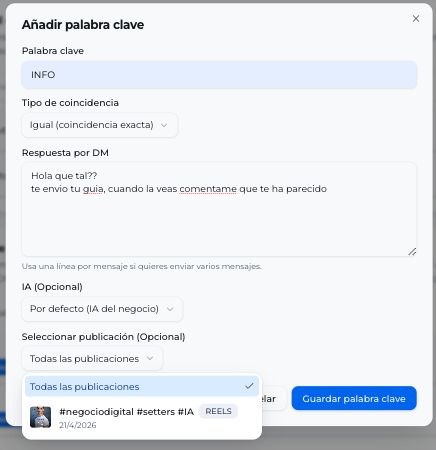
- Keyword and match type: Equals (exact match) or Contains (partial match).
- DM reply: the text the lead receives. It goes out as a single message, and any line breaks you write are kept as formatting inside it.
- Button with link (optional): deliver the resource as a tappable button instead of a bare URL inside the text.
- AI (optional): if you want the lead assigned to a specific agent. Defaults to the business AI.
- Publication (optional): choose One specific post or reel and pick it in the Publications grid to limit the keyword to that publication. If you leave Any post or reel, it applies to All posts.
How the comment is matched against the keyword
Section titled “How the comment is matched against the keyword”Matching is tolerant of the way people actually write in comments:
-
Case and accents don’t matter:
INFO,infoandínfoall count. -
Emojis, mentions and punctuation are ignored:
INFO! 🔥 @youraccountstill triggersINFO. -
Small typos are accepted on longer keywords: a letter changed, added or missing still activates the keyword. Short keywords have to match exactly, so they don’t fire on unrelated words.
-
With the Equals type, the cleaned-up comment is compared:
list!orLIST! 🙌trigger the keywordlist, butList pleasedoesn’t, because it has more words. -
A comment with several keywords sends a single reply. One winning keyword is picked: first the one assigned to that publication, then Equals before Contains, and then the longest one.
This cuts down on comments that went unanswered because of an emoji or a typo. You don’t need to duplicate a keyword with and without accents or in capitals: menu already triggers on menú, MENU and Menú. All the rules, with examples, are in How a keyword is matched.
Deliver the resource as a button
Section titled “Deliver the resource as a button”Instead of pasting the URL inside the text, you can attach a button with link to the keyword. It’s two fields:
- Button link: the address it opens when tapped. It has to start with
http://orhttps://. - Button text: the label the lead sees. Instagram cuts it at 20 characters.
Fill in both fields or leave both empty: a half-finished button won’t save.
The button travels on that same message, which is exactly the only one that reaches someone who has commented but never written to you.
Typical case
Section titled “Typical case”Using the same keyword on multiple publications
Section titled “Using the same keyword on multiple publications”Is it possible to use two keywords with the same name for two different publications? For example, Post 1 has the keyword INFO and Post 2 also has INFO.
Yes, you can do it, as long as each keyword is assigned to a specific publication from the Publication field (One specific post or reel option).
If the keyword is created without assigning a specific publication (it stays on All posts), it won’t work when another one with the same name exists.
Story CTAs
Section titled “Story CTAs”The Stories tab covers what happens when someone replies to one of your Instagram stories with a keyword: the AI you pick takes over that conversation and follows the instruction you wrote.
Each story CTA has three fields:
| Field | What it does |
|---|---|
| Keyword | The term the lead writes when replying to the story. E.g. info. |
| AI | The agent that takes the conversation from that point on. |
| What should the AI do? | The instruction that AI will follow. E.g. Send the price list and offer a call this week. |
When you save, the instruction is added to the instructions of the agent you picked. If the keyword isn’t on your keyword list yet, it’s added and pointed at that AI. You can delete a CTA whenever you no longer need it.
Best practices
Section titled “Best practices”- Keep between 3 and 5 varied public replies so they don’t look like a template.
- For specific campaigns, always restrict the keyword to the campaign reel or post; that way it doesn’t fire replies on old publications.
- If the comment doesn’t match any keyword and you want the AI to keep managing the lead, also enable Message privately even without a keyword match.
If the content doesn’t arrive by DM
Section titled “If the content doesn’t arrive by DM”If the lead comments a valid keyword but doesn’t receive the private message, it’s usually due to one of these causes:
- The lead doesn’t allow messages from your account (their Instagram privacy blocks it).
- You have ManyChat active and it’s intercepting the comment before ZeroChats. Run only one of the two automations per publication.
- Meta failed to deliver the DM. It’s an intermittent failure on Meta’s side (it also happens with ManyChat). If it’s a one-off, nothing needs changing; if it repeats, check the Instagram connection status.